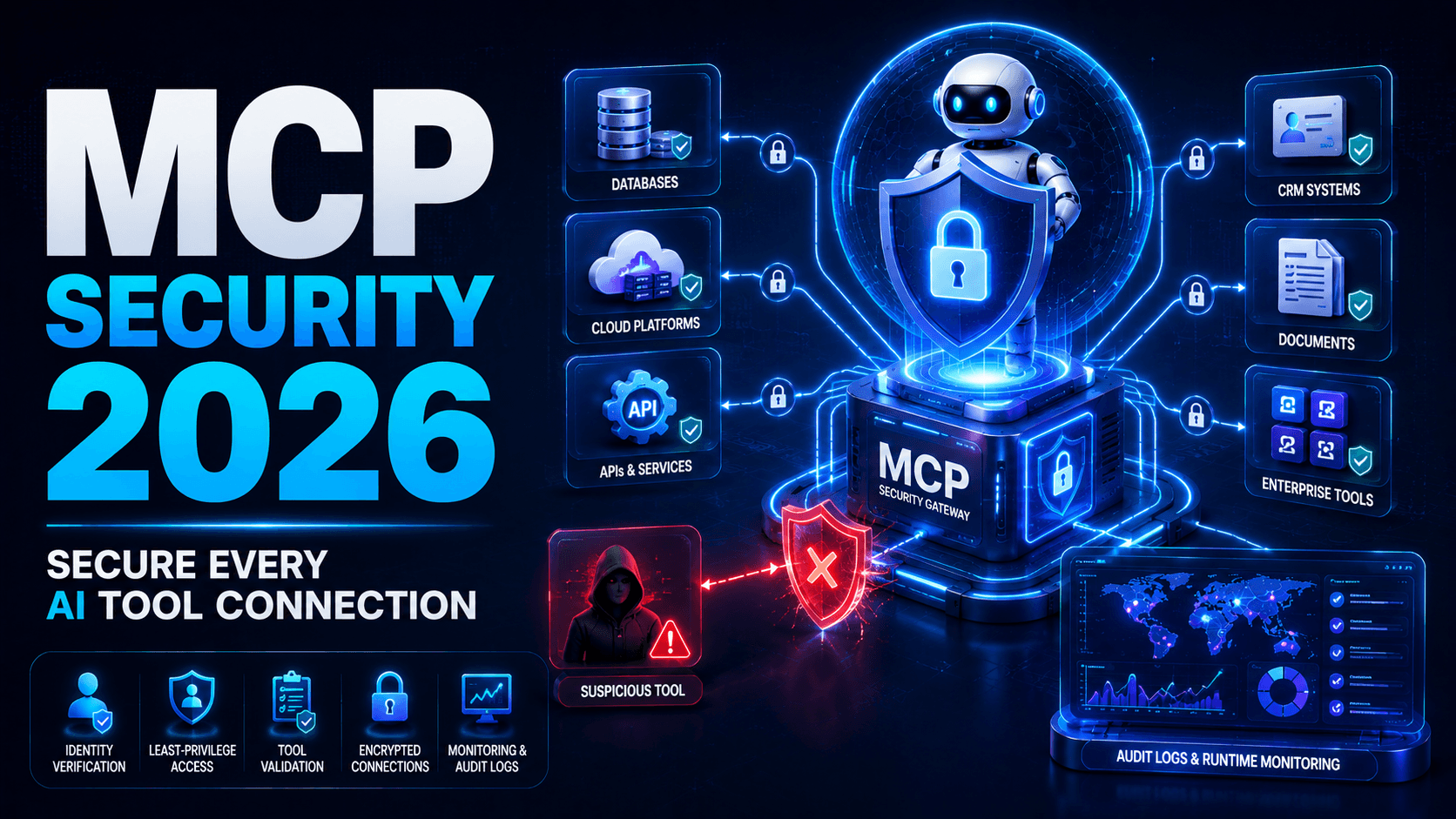
MCP Security in 2026: Securing the New Connection Layer for AI Agents
Learn how enterprises can secure Model Context Protocol (MCP) deployments against tool poisoning, prompt injection, excessive permissions, credential exposure and unauthorized data access.
AI agents are moving beyond simple chat.
Modern agents can search databases, access documents, call APIs, update CRM records, interact with cloud infrastructure and execute business workflows.
That creates enormous potential—but also a new security problem.
What happens when an AI agent can access dozens of tools through a standardized connection layer?
One of the most important technologies in this space is the Model Context Protocol (MCP).
MCP provides a standardized way for AI applications to interact with external tools, services and data sources. Its adoption has expanded rapidly across business, finance, legal, software development and other environments. In May 2026, the NSA released dedicated security guidance for AI-driven automation using MCP.
The important lesson is simple:
Connecting an AI agent to a tool is also creating a new trust boundary.
What Is MCP?
The Model Context Protocol is an application-level protocol designed to standardize how AI applications interact with external systems.
Instead of building a custom integration for every AI application and every business tool, organizations can use MCP-based servers and clients to create a more standardized connection model.
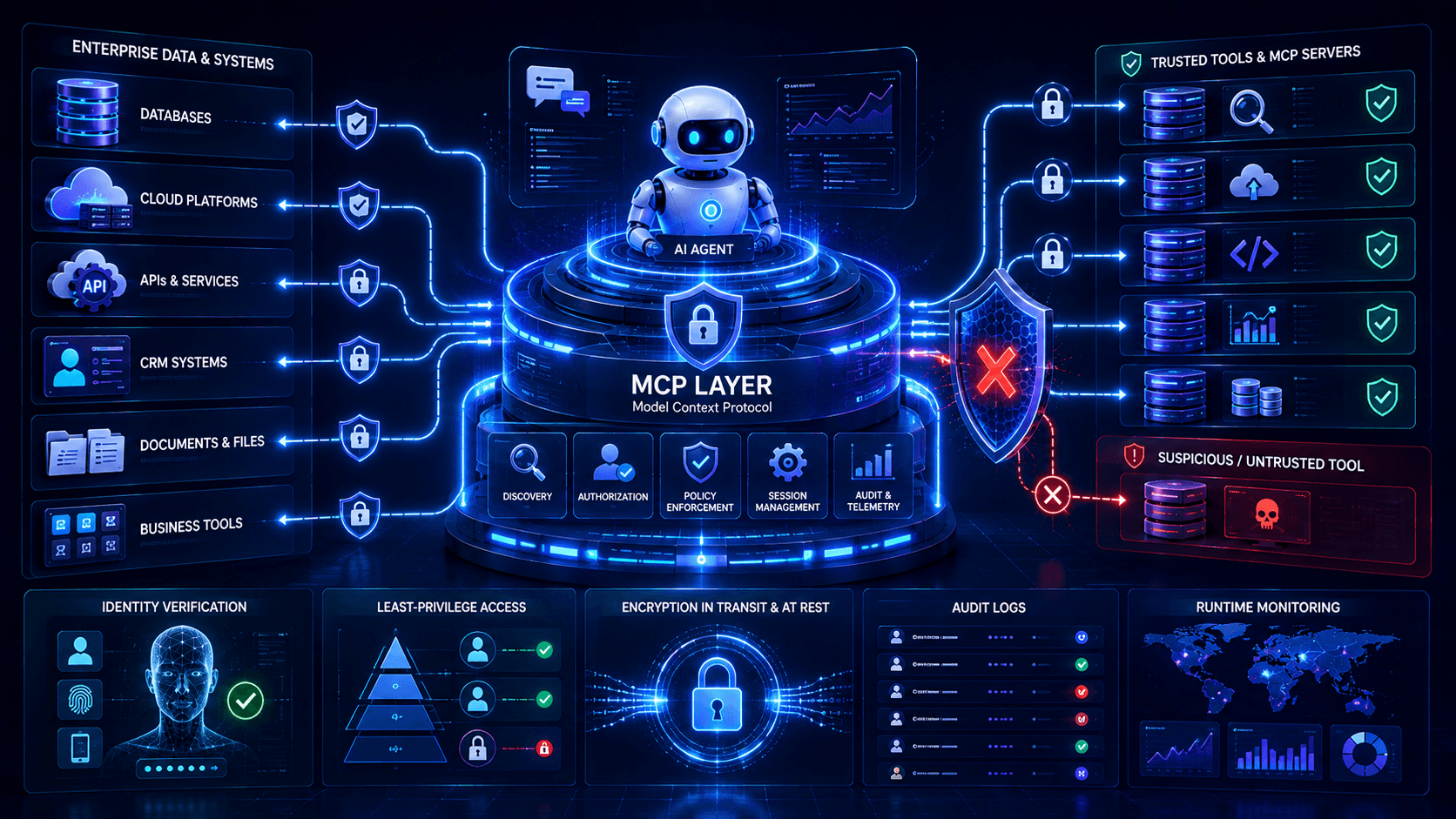
An AI system could potentially connect to:
- Databases
- Cloud storage
- CRM systems
- Git repositories
- APIs
- Business applications
- Internal documents
- Search systems
- Developer tools
- Analytics platforms
This makes AI agents significantly more capable.
It also makes security more complicated.
Why MCP Security Matters in 2026
Traditional API security assumes that an application is making a relatively predictable request.
AI agents behave differently.
An agent can interpret information, choose tools, generate parameters and decide what to do next.
This means security teams must consider not only:
Who is calling the API?
but also:
What tool did the agent discover?
What instructions came with that tool?
What permissions does the tool have?
What data can it access?
What happens after the tool returns information?
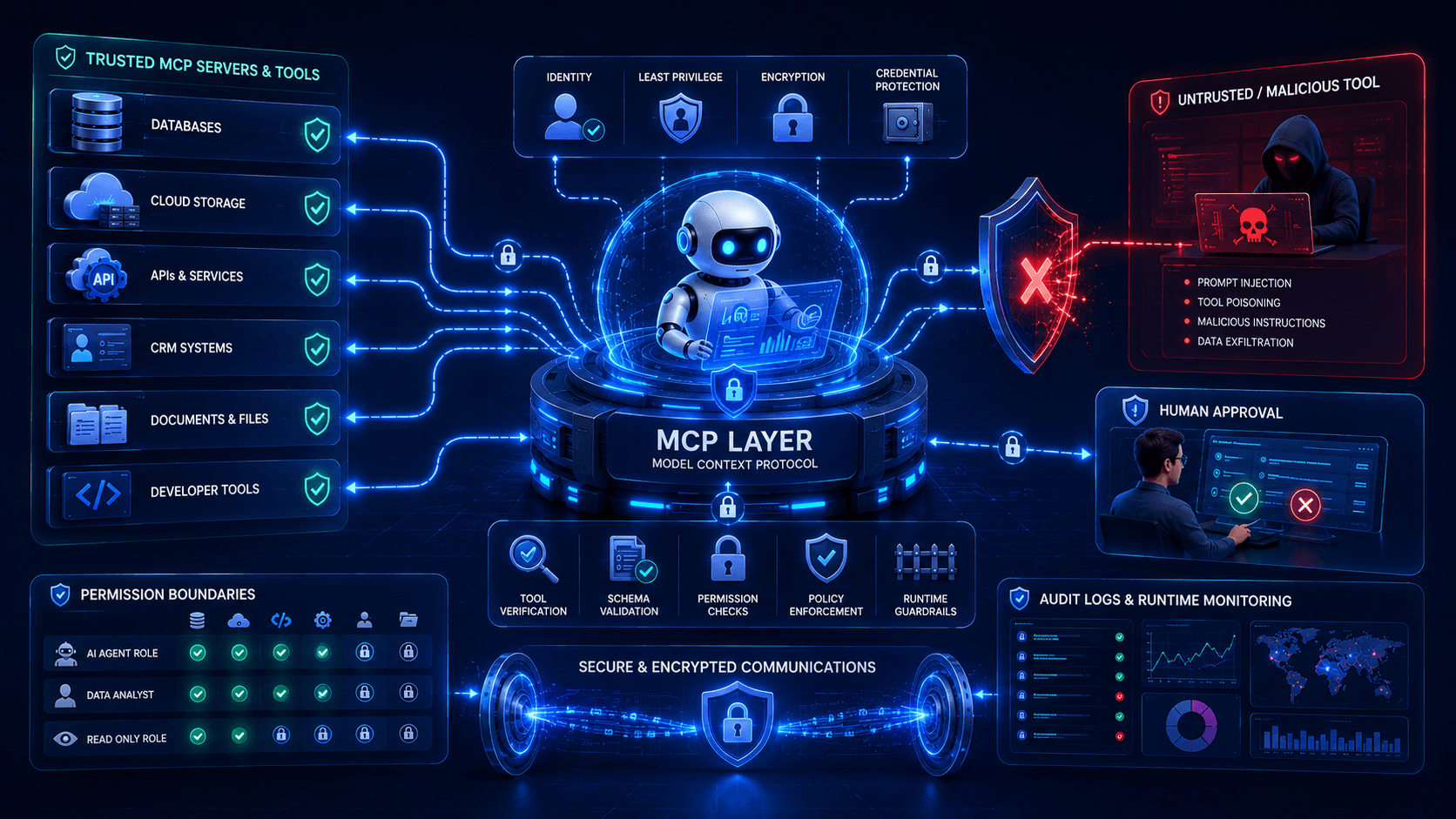
Research and security guidance increasingly highlight MCP-specific risks including tool poisoning, prompt injection, excessive permissions, token exposure and rogue or poorly secured servers.
The New MCP Attack Surface
MCP introduces several security layers that organizations need to understand.
1. MCP Servers
An MCP server can expose tools and resources to an AI application.
If that server is compromised or incorrectly configured, the AI agent may receive dangerous capabilities.
For example, an apparently harmless tool could have access to:
- Internal files
- Customer databases
- Cloud APIs
- Source code
- Administrative functions
The security of the agent therefore depends partly on the security of every connected server.
2. Tool Poisoning
One particularly interesting threat is tool poisoning.
AI agents often rely on descriptions and metadata to understand what a tool does.
A malicious or compromised tool could include instructions designed to influence the model's behaviour.
The danger is that the attack does not necessarily look like a traditional exploit.
Instead, malicious instructions can be embedded inside information the AI interprets as tool context.
Research examining MCP client security has specifically identified tool poisoning as a significant client-side risk.
3. Prompt Injection Through Tools
Prompt injection is not limited to the user's initial prompt.
An agent can retrieve information from:
- Websites
- Documents
- Emails
- Tickets
- Database records
- Tool responses
Any of these sources could contain malicious instructions.
For example:
User → AI Agent → MCP Tool → Malicious Document → Tool Response → AI Agent
The malicious content may then influence what the agent does next.
This is why organizations should treat tool output as untrusted input rather than automatically trusted instructions.
4. Excessive Agent Permissions
One of the biggest risks is giving an AI agent too much authority.
Consider an agent designed to answer customer-support questions.
It might only need:
Read customer order status
But instead, it receives:
Read + write access to the entire CRM
That creates unnecessary risk.
A secure MCP architecture should follow:
Least Privilege
Give each agent and tool only the permissions required for its approved workflow.
5. Credential Exposure
MCP-based workflows may involve:
- API keys
- OAuth tokens
- Cloud credentials
- Database credentials
- Service identities
If these credentials are unnecessarily exposed to the AI runtime, logs or tools, the potential impact of a compromise increases.
Credentials should therefore be:
- Scoped
- Protected
- Short-lived where practical
- Rotated
- Audited
- Never unnecessarily exposed to model context
6. Rogue MCP Servers
Organizations may deploy MCP servers internally, use third-party servers or allow developers to connect external services.
This creates a supply-chain question:
Do you trust every MCP server your AI agents can reach?
A rogue or compromised server could expose malicious tools or attempt to collect sensitive information.
MCP security therefore needs a server inventory and approval process.
MCP Changes the Traditional Trust Model
Before agentic AI, an enterprise application might have a relatively predictable architecture:
User → Application → API → Database
With an AI agent, the architecture becomes more dynamic:
User → AI Agent → Tool Discovery → MCP Server → API → Database
The agent can potentially choose among multiple tools and create multi-step workflows.
This means the integration layer itself becomes a security boundary.
Security teams need visibility into the complete chain.
What a Secure MCP Architecture Should Include
A mature MCP security architecture should use multiple layers of protection.
Identity Verification
Every important component should have a known identity.
Security teams should be able to answer:
- Which user initiated the request?
- Which AI agent executed it?
- Which MCP server handled it?
- Which tool was called?
- Which downstream service received the request?
Fine-Grained Authorization
Do not simply ask:
“Can this agent access the system?”
Ask:
“Can this agent perform this specific action on this specific resource?”
This enables more precise policies.
Tool Allowlisting
Organizations should maintain approved MCP servers and tools.
A production agent should not automatically trust every tool it discovers.
Tool Metadata Validation
Tool descriptions and schemas should be inspected before being trusted by an AI system.
Security controls can help identify unexpected instructions, dangerous parameters or changes in approved tool behaviour.
Network Controls
MCP servers should have controlled network access.
Restrict unnecessary:
- Internet access
- Internal network access
- Database access
- Cloud endpoints
This limits the blast radius if an agent or server is compromised.
Runtime Monitoring
Security teams should monitor:
- Tool calls
- Agent decisions
- Authentication events
- Permission changes
- Data access
- Network connections
- Failed requests
- Unusual workflows
A strong audit trail should allow investigators to reconstruct what happened.
Human Approval Still Matters
Not every AI action should be fully autonomous.
High-impact operations can require human approval.
Examples:
- Sending external communications
- Deleting data
- Changing customer records
- Executing financial transactions
- Modifying cloud infrastructure
- Changing security policies
- Accessing highly confidential information
A useful pattern is:
AI proposes → Security policy evaluates → Human approves → Tool executes
This creates a safety checkpoint between AI reasoning and high-impact action.
MCP Security vs API Security
MCP does not replace traditional API security.
Instead, it introduces another layer.
Traditional API security focuses on:
- Authentication
- Authorization
- Rate limiting
- Encryption
- API gateways
- Monitoring
MCP security adds questions such as:
- Is the tool trustworthy?
- Can its description influence the model?
- Is the tool over-privileged?
- Can tool output contain malicious instructions?
- Can the agent discover unauthorized tools?
- Can one tool cause an unsafe chain of actions?
This is why organizations should treat MCP security as an extension of their existing security architecture—not as a replacement.
A Practical MCP Security Checklist
Before putting an MCP-based agent into production, security teams should ask:
Identity
- Does every agent have a distinct identity?
- Are MCP servers authenticated?
- Are credentials properly scoped?
Authorization
- Are permissions based on least privilege?
- Can agents access only approved tools?
- Are write operations restricted?
Tool Security
- Are MCP servers approved?
- Are tool schemas validated?
- Are unexpected tool changes detected?
Data Protection
- Can tools access sensitive customer information?
- Is sensitive data unnecessarily entering model context?
- Are data flows monitored?
Runtime Security
- Are tool calls logged?
- Are unusual behaviours detected?
- Are high-risk actions subject to approval?
Network Security
- Can MCP servers reach arbitrary internal systems?
- Is outbound traffic restricted?
- Are sensitive services isolated?
Governance
- Is there an inventory of MCP servers?
- Are third-party tools reviewed?
- Is there an incident-response process?
Common MCP Security Mistakes
Treating MCP Like a Normal API
MCP introduces AI-driven decision-making into the interaction.
Security controls need to account for that additional layer.
Trusting Every Tool
Tool discovery should never automatically mean tool trust.
Giving Agents Administrator Access
AI agents should almost never receive broad permissions simply because it makes development easier.
Ignoring Tool Responses
Tool output can contain untrusted information and potentially malicious instructions.
Skipping Runtime Monitoring
Pre-deployment testing is useful, but production behaviour can change as agents interact with new data and tools.
Storing Long-Lived Credentials
Long-lived secrets increase the potential impact of credential theft.
Forgetting Human Approval
High-impact operations should have clear escalation and approval mechanisms.
How Businesses Can Secure MCP Step by Step
Step 1: Build an MCP Inventory
Identify every MCP server, client, agent and connected tool.
Step 2: Map Trust Relationships
Document:
User → Agent → MCP Client → MCP Server → Tool → Data/API
Step 3: Classify Data
Identify which connected systems contain:
- Customer data
- Financial information
- Intellectual property
- Credentials
- Personal information
Step 4: Apply Least Privilege
Reduce every agent and tool to the minimum permissions required.
Step 5: Validate Tools
Approve trusted MCP servers and inspect tool metadata and behaviour.
Step 6: Add Runtime Controls
Monitor tool calls, data movement and unusual agent behaviour.
Step 7: Add Human Approval
Require confirmation for high-risk actions.
Step 8: Test Adversarially
Test for:
- Prompt injection
- Tool poisoning
- Privilege escalation
- Data exfiltration
- Credential exposure
- Unauthorized tool use
Step 9: Continuously Review
MCP environments evolve quickly.
New tools, servers and agents should go through the same security process as the original deployment.
The Future of MCP Security
MCP is becoming part of a broader agentic-AI ecosystem.
At the same time, standards for agent-to-agent communication are also developing. For example, Google's Agent2Agent protocol has moved toward the Agentic AI Foundation, with A2A focusing on communication between agents while MCP focuses on connections between AI applications, tools and data.
This means enterprise AI architectures may increasingly contain:
Users → AI Agents → Agent-to-Agent Communication → MCP Tools → APIs → Data
Security will therefore need to follow the entire chain.
The future challenge isn't simply securing the AI model.
It's securing the AI action ecosystem around the model.
Final Thoughts
MCP makes AI agents dramatically more useful by giving them structured access to tools, data and enterprise systems.
But every new connection creates another trust boundary.
Organizations adopting MCP in 2026 should therefore focus on:
Identity + Least Privilege + Tool Verification + Data Protection + Runtime Monitoring + Human Approval
The goal isn't to stop AI agents from using tools.
The goal is to ensure that every tool call is:
authorized, observable, constrained and explainable.
As AI moves from answering questions to taking actions, MCP security will become a core part of enterprise AI security architecture.
FAQs
What is MCP security?
MCP security refers to the controls used to protect AI applications, agents, MCP servers, tools, credentials and data connected through the Model Context Protocol.
What are the biggest MCP security risks?
Major concerns include prompt injection, tool poisoning, excessive permissions, credential exposure, rogue servers, unauthorized data access and insufficient monitoring.
Is MCP secure by default?
MCP should not be treated as automatically secure simply because it standardizes AI-to-tool communication. Organizations still need to implement appropriate authentication, authorization, network controls, tool validation and monitoring.
Should AI agents have write access?
Only when required. Write permissions should be narrowly scoped, monitored and ideally protected by human approval for high-impact actions.
How can companies start securing MCP?
Start with an inventory of MCP servers and tools, map data flows, enforce least privilege, validate tools, secure credentials and implement runtime monitoring.
Why is MCP important for enterprise AI?
It provides a standardized way for AI applications to connect with tools and data, making agentic workflows easier to build—but also making the security of those connections increasingly important.