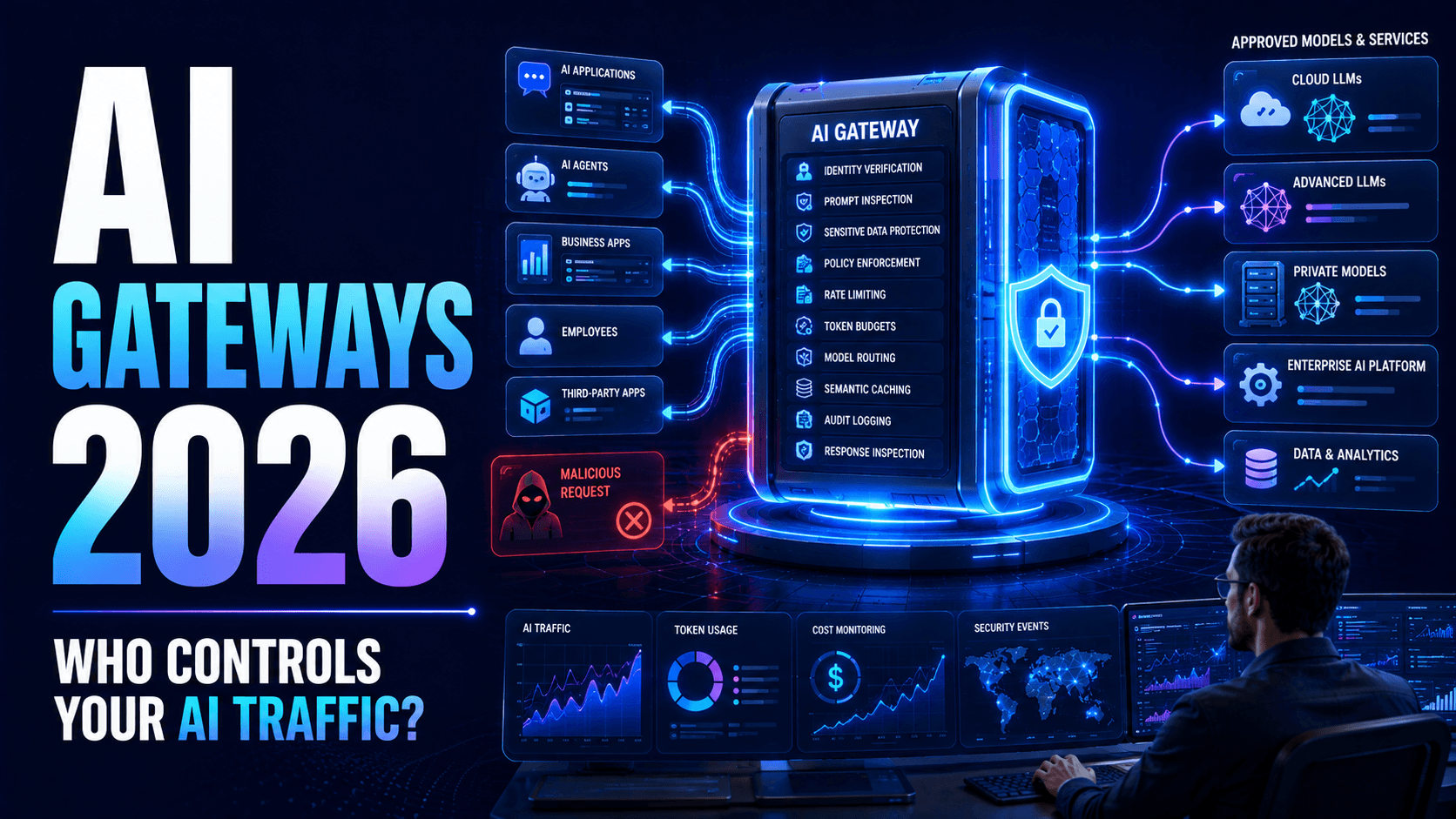
AI Gateways in 2026: How Businesses Can Secure and Control Enterprise AI
Learn how AI gateways help enterprises secure LLMs and AI agents, protect sensitive data, control model access, monitor costs and enforce AI policies.

Enterprise AI architecture is becoming complicated.
A few years ago, a company might have experimented with one AI chatbot connected to one model.
Today, the same organisation may have customer-service assistants, internal copilots, autonomous agents, document-processing systems, developer tools and AI-powered applications.
Behind those applications may sit several different AI models.
Some requests go to commercial cloud models.
Others go to private models.
Some contain public information.
Others contain confidential customer or company data.
And AI agents may call external tools after receiving a response.
This creates an important infrastructure question:
How does a business control all of this AI traffic from one place?
One emerging answer is the AI gateway.
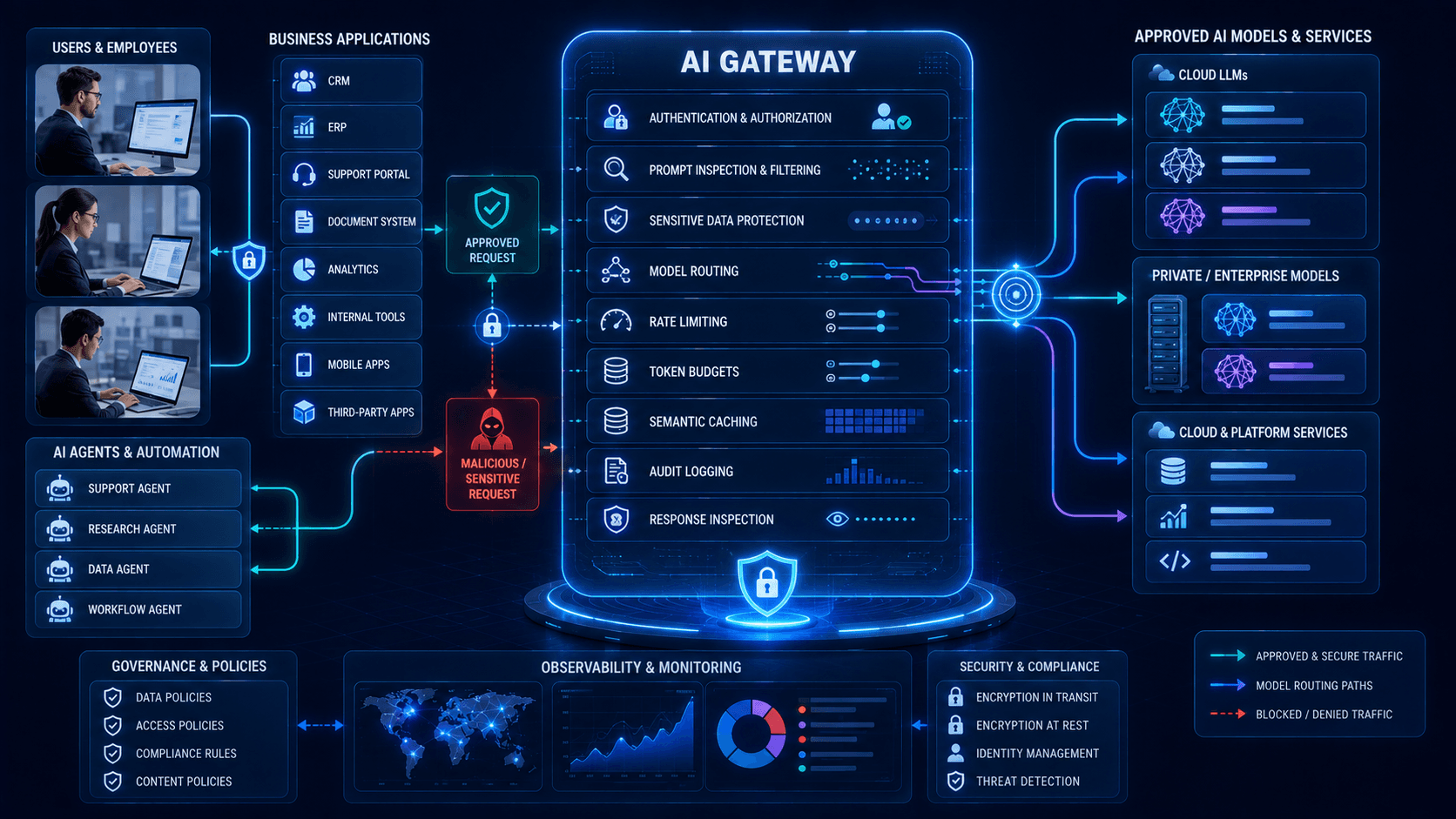
An AI gateway acts as a controlled layer between applications, AI agents and the models or services they use.
Instead of allowing every application to connect directly to every model, requests can pass through a central layer responsible for security, routing, monitoring and governance.
For enterprises scaling AI beyond isolated experiments, this control layer can become increasingly important.
What Is an AI Gateway?
An AI gateway is infrastructure positioned between AI-consuming applications and the models they access.
A simplified architecture looks like:
Employees / Customers
↓
Business Applications & AI Agents
↓
AI Gateway
↓
Approved AI Models
↓
Enterprise Data & Tools
The gateway can inspect and control requests before they reach an AI provider.
It can also evaluate responses before they return to applications.
Depending on the implementation, an AI gateway may provide:
- Authentication
- Authorization
- Model routing
- Prompt filtering
- Sensitive-data protection
- Rate limiting
- Token monitoring
- Cost controls
- Logging
- Model fallback
- Security policies
- Observability
The goal is not simply to connect AI models.
It is to create a governed entry point for enterprise AI usage.
Why Traditional API Management Is Not Enough
Traditional API gateways solve important problems.
They authenticate users, enforce rate limits, route traffic and monitor APIs.
But generative AI introduces additional requirements.
A traditional API request may be predictable.
An AI prompt can contain almost anything.
It may include:
- Customer information
- Internal documents
- Source code
- Financial information
- Personal data
- Malicious instructions
- Extremely large context
- Confidential intellectual property
The response is also probabilistic rather than completely deterministic.
Therefore organisations increasingly need controls designed specifically for AI workloads.
An AI gateway can complement existing API-management infrastructure rather than necessarily replacing it.
Why AI Gateways Matter in 2026
Companies are no longer using one model for everything.
Different workloads may require different combinations of:
- Performance
- Cost
- Privacy
- Reasoning ability
- Context length
- Geographic availability
- Reliability
Without central management, individual development teams may connect directly to different AI providers.
Over time, this can create an environment that is difficult to understand or govern.
Security teams may not know where confidential information is being sent.
Finance teams may not know which application is generating AI costs.
Developers may not know which model is most appropriate for each request.
An AI gateway provides a point where these decisions can be controlled.
Use Case #1: Multi-Model Routing
Imagine an organisation uses several AI models.
A simple classification request may not require its most expensive reasoning model.
The gateway could route simple tasks to a faster or lower-cost approved model.
Complex reasoning tasks could use a more capable model.
Sensitive workloads might be routed only to an approved private environment.
Routing decisions could consider:
Request → Sensitivity → Task → Cost → Availability → Approved Model
This reduces the need for every application to contain its own routing logic.
Use Case #2: Sensitive Data Protection
Employees may accidentally include confidential information inside prompts.
For example:
“Summarise this customer complaint.”
The employee then pastes information containing names, addresses, phone numbers and account identifiers.
An AI gateway may inspect the request and apply an organisational policy before forwarding it.
Depending on business requirements, the system might:
- Allow it
- Mask selected fields
- Route it to a private model
- Request approval
- Block it
This provides another layer of protection around AI usage.
Use Case #3: Model Access Control
Not every employee or application needs access to every model.
A marketing assistant may use one approved model.
A developer assistant may need another.
A financial application handling sensitive information may only use models approved for that environment.
The gateway can enforce these restrictions centrally.
Use Case #4: AI Cost Management
Generative AI consumption can become difficult to understand as adoption grows.
Different teams may generate:
- Input tokens
- Output tokens
- Embedding requests
- Image generations
- Agent calls
- Repeated retries
A central gateway can associate usage with:
- Department
- Application
- Agent
- Model
- User
- Project
This gives businesses better visibility into where AI budgets are being consumed.
Use Case #5: Model Fallback
AI providers and models can experience failures, throttling or performance issues.
A gateway can potentially route requests to an approved alternative.
For example:
Primary Model
↓
Unavailable
↓
Approved Backup Model
This can improve application resilience.
Fallback must still respect data sensitivity and compliance requirements.
A private workload should not suddenly be routed to an inappropriate external model simply because the preferred system is unavailable.
Use Case #6: AI Agent Governance
AI agents may generate far more model requests than human users.
One user request could trigger:
- Planning
- Search
- Retrieval
- Tool selection
- Verification
- Summarisation
- Follow-up reasoning
A poorly configured agent could create hundreds of unnecessary requests.
AI gateways can apply limits according to agent identity and workload.
This helps prevent runaway automation from creating excessive cost or traffic.
Prompt Injection Protection
Prompt injection attempts to manipulate an AI system through malicious instructions.
These instructions may originate from:
- Users
- Documents
- Websites
- Emails
- Databases
- Retrieved content
An AI gateway can provide one inspection point where suspicious patterns are evaluated.
However, businesses should not assume a prompt filter alone can eliminate prompt injection.
Security must also exist around:
- Tool permissions
- Data access
- Agent identity
- Human approval
- Application architecture
The safest system assumes that some malicious instructions will eventually reach the model.
The surrounding architecture should limit what those instructions can cause.
Data Loss Prevention
AI applications create a new route through which sensitive information may leave an organisation.
An AI gateway can integrate with Data Loss Prevention policies.
For example, the gateway could detect:
- Payment-card numbers
- Customer identifiers
- Employee records
- API credentials
- Confidential document classifications
Depending on policy, it can redact or block the request.
This is especially useful when employees interact with AI through multiple applications.
Rate Limiting
Traditional APIs already use rate limits.
AI workloads make them even more important.
An application bug could generate thousands of expensive model calls.
A compromised API credential could also be abused.
Limits can be defined per:
- User
- Agent
- Application
- Department
- Model
Rate limiting reduces both security and financial risk.
Token Budgets
A request may be technically valid but financially inefficient.
Organisations can establish token budgets.
For example:
Customer Support Agent: limited context and response size.
Research Agent: larger allowance.
Executive Analysis Workflow: premium reasoning model allowed.
Budgets should align computing resources with actual business value.
Semantic Caching
Businesses frequently send similar requests to AI systems.
If the same safe question has already been answered, the system may be able to reuse an appropriate result rather than requesting another model inference.
Caching can reduce:
- Cost
- Latency
- Provider usage
However, caching must be designed carefully.
A response generated using one customer's private information must never accidentally be returned to another customer.
AI Gateway Observability
Businesses need more than uptime monitoring.
They should understand how AI is behaving.
Useful gateway metrics may include:
- Requests per application
- Token consumption
- Model usage
- Response latency
- Failed requests
- Blocked prompts
- Sensitive-data detections
- Estimated cost
- Fallback frequency
- Security events
This information helps engineering, finance and security teams understand the same AI environment from different perspectives.
Shadow AI Detection
Employees may start using AI services without formal approval.
Developers may also create direct model connections that bypass central controls.
This creates Shadow AI.
Businesses should identify where AI models are being accessed and provide approved alternatives that are easy to use.
Central gateway infrastructure can reduce the incentive for each development team to create independent integrations.
Model Vendor Independence
Applications directly integrated with one provider may become difficult to migrate.
A gateway can introduce an abstraction layer.
Instead of every application implementing provider-specific logic, applications communicate with the gateway.
The gateway handles downstream integrations.
This does not make models completely interchangeable.
Different models have different:
- Capabilities
- Prompt behaviour
- APIs
- Tool support
- Context limits
But abstraction can reduce unnecessary dependency.
AI Gateway Security Architecture
A mature deployment may include:
User / Application
↓
Identity Verification
↓
AI Gateway
↓
Policy Engine
↓
DLP / Prompt Security
↓
Model Router
↓
Approved AI Provider
↓
Response Inspection
↓
Application
Supporting systems may include:
- Secrets management
- SIEM
- Cost analytics
- Audit logs
- Model registry
- Human approval
This creates layered control rather than relying on one security mechanism.
Authentication and Machine Identity
Every request should have an identifiable origin.
The business should know whether a request came from:
- Employee
- Customer
- Application
- AI agent
- Automated workflow
Shared credentials make accountability difficult.
AI applications and agents should have managed machine identities where possible.
Least Privilege
An application should only access the models and capabilities required for its job.
For example, an internal FAQ bot may not require:
- Image generation
- External tools
- Premium reasoning
- Production database access
Reducing unnecessary capabilities reduces the potential impact of compromise.
Human Approval
AI gateways can also participate in approval workflows.
A low-risk summarisation request may proceed automatically.
A request containing restricted information could require approval.
This is particularly important when an AI agent combines model access with real-world actions.
What Businesses Should Do Now
1. Inventory AI Usage
Identify every model and AI provider currently used across the organisation.
2. Map Data Flows
Understand which information is sent to which model.
3. Classify AI Applications
Separate low-risk productivity tools from high-impact operational systems.
4. Define Approved Models
Determine which models may process each category of information.
5. Establish Identity
Every application and agent should have a clearly identifiable owner.
6. Centralise Credentials
Do not distribute model API keys throughout source code and employee devices.
7. Add Usage Monitoring
Track requests, tokens, latency and cost.
8. Establish Security Policies
Define which information can leave the organisation.
9. Configure Fallback Carefully
Backup models must satisfy the same security requirements.
10. Start With High-Value Applications
Do not centralise everything overnight.
Begin with applications generating the greatest cost, security exposure or business impact.
Common AI Gateway Mistakes
Treating It as Only a Proxy
Routing traffic is only one function.
Governance and observability create much of the enterprise value.
Logging Sensitive Prompts Indefinitely
Observability systems can themselves become repositories of confidential information.
One Policy for Every Application
Different workloads require different security and cost controls.
Uncontrolled Fallback
Never route sensitive workloads to arbitrary models during failures.
Ignoring Agents
Autonomous agents may consume significantly more resources than normal applications.
Relying Only on Prompt Filters
Model security must be combined with access controls and application-level safeguards.
What Arrowhead DigiTech Is Doing
At Arrowhead DigiTech, we help businesses create controlled infrastructure for enterprise AI.
AI Gateway Architecture
We design central access layers connecting business applications to approved AI models.
Multi-Model Integration
We integrate multiple AI providers and private models into controlled environments.
Intelligent Model Routing
We route workloads according to cost, performance and business requirements.
AI Security
We implement authentication, policy controls, prompt protection and sensitive-data safeguards.
AI Cost Monitoring
We track token usage and model consumption across applications.
Agent Governance
We establish limits and policies for autonomous AI systems.
API Security
We protect the APIs connecting applications, models and enterprise tools.
AI Observability
We build dashboards for model usage, latency, security events and operational performance.
Cloud Architecture
We deploy scalable AI infrastructure across appropriate cloud and private environments.
AI Governance
We establish model inventories, ownership, approval processes and usage policies.
Final Thoughts
The enterprise AI challenge is changing.
Businesses are no longer asking only:
“Which AI model should we use?”
They increasingly need to ask:
“How do we securely control dozens of applications, agents and models at the same time?”
AI gateways provide one possible answer.
They create a control layer where organisations can enforce identity, security, routing, privacy, budgets and observability.
As enterprise AI grows, the most valuable infrastructure may not always be the model itself.
It may be the layer that decides: