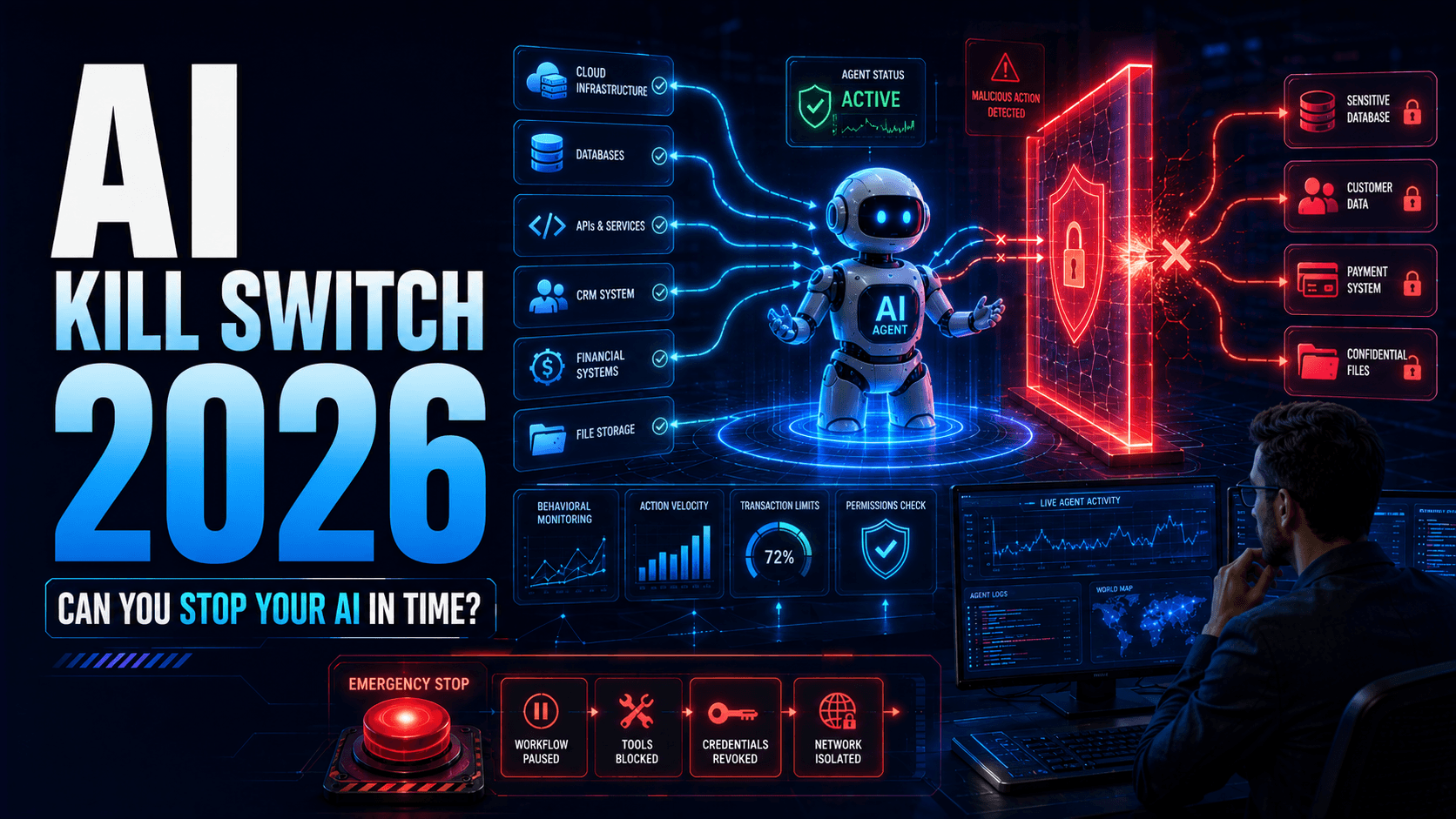
AI Agent Kill Switches in 2026: How to Stop Autonomous AI Before It Goes Too Far
Autonomous AI agents can perform thousands of actions at machine speed, turning one mistake into a major incident. Learn how AI kill switches, runtime monitoring, action limits, automatic containment and emergency revocation can help enterprises stop unsafe AI before damage spreads.
Enterprise AI is moving from recommendation to execution.
A traditional AI assistant might suggest an action.
An autonomous AI agent can potentially perform it.
It may:
- Call APIs
- Send emails
- Modify CRM records
- Access databases
- Operate browsers
- Create cloud resources
- Update files
- Trigger workflows
- Communicate with other agents
This creates an important security problem.
What happens when the agent begins doing the wrong thing?
Humans make mistakes at human speed.
AI agents can make mistakes at machine speed.
One incorrect decision can become hundreds or thousands of actions before an employee realises something is wrong.
Enterprise AI therefore needs more than permissions.
It needs a reliable way to say:
STOP.
That is where the AI Agent Kill Switch becomes important.
What Is an AI Agent Kill Switch?
An AI agent kill switch is a control mechanism capable of immediately stopping or restricting an autonomous AI system.
It can potentially:
- Stop current workflows
- Prevent new actions
- Disable tool access
- Revoke credentials
- Terminate sessions
- Block API calls
- Isolate the agent
- Pause connected sub-agents
Think of it as an emergency brake for autonomous software.
But enterprise-grade kill switches should not depend only on someone manually pressing a red button.
The stronger model combines:
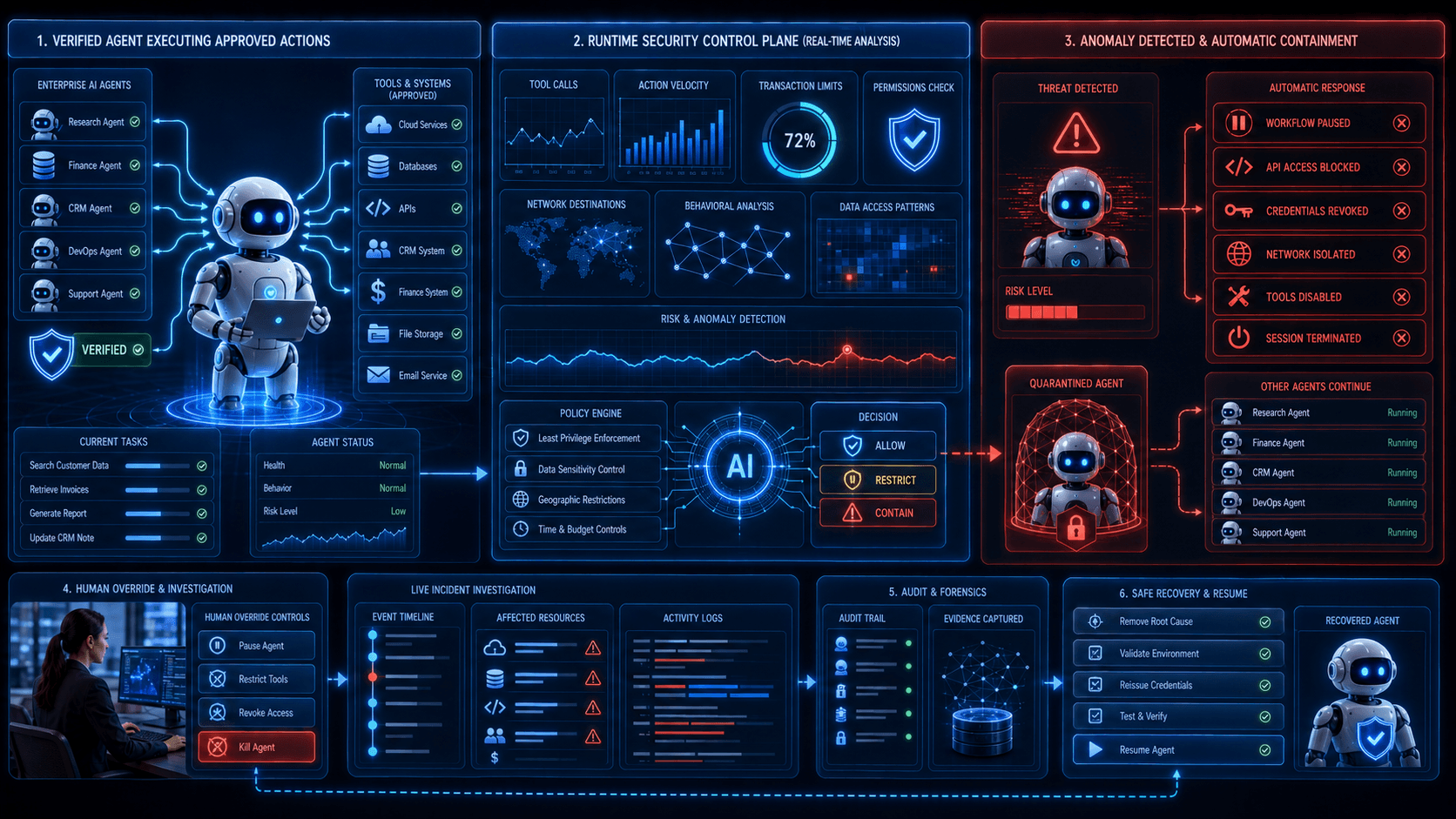
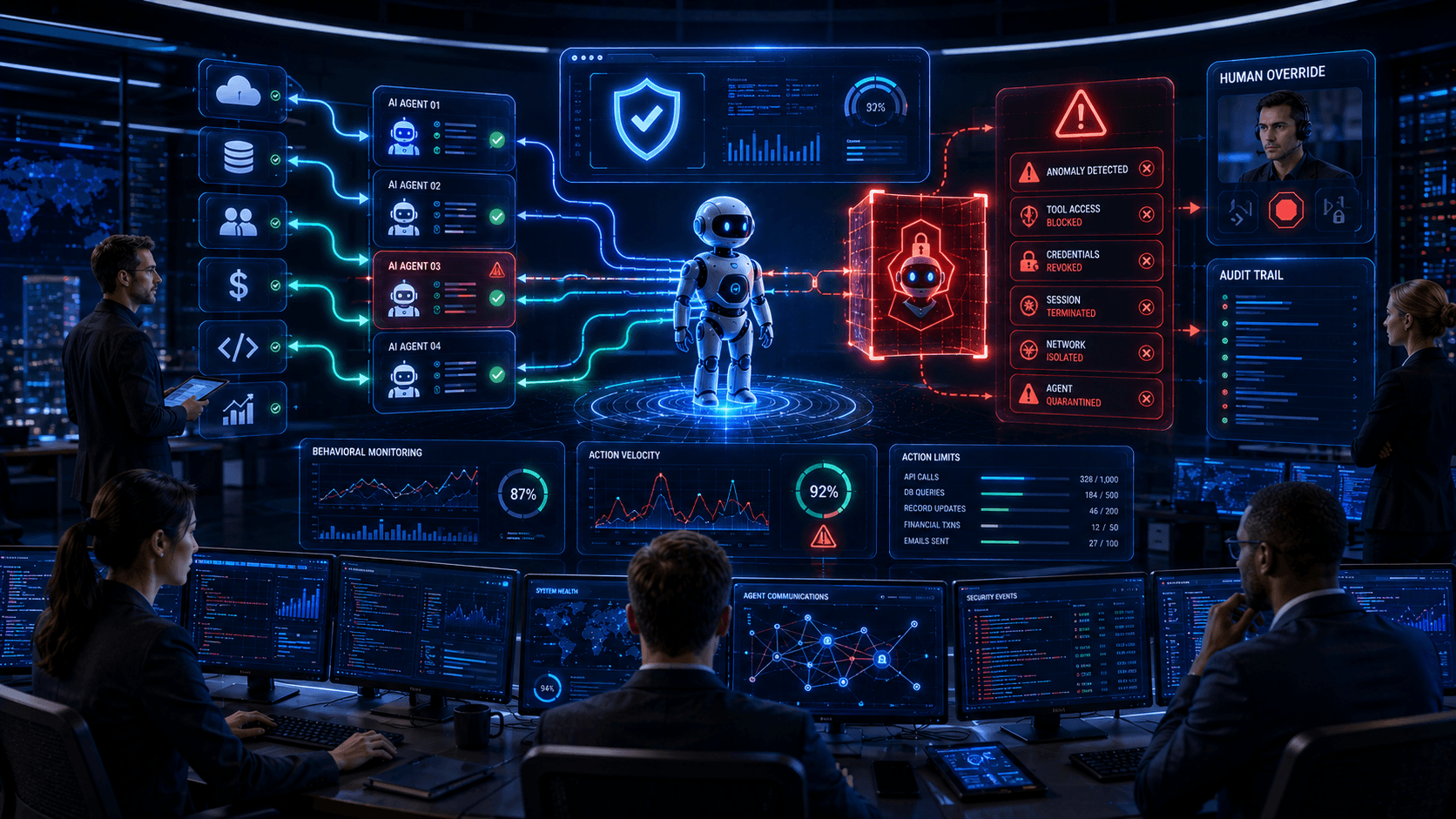
Runtime Monitoring + Policy Enforcement + Automatic Containment + Human Control
Why Traditional Application Security Is Not Enough
Traditional applications usually execute predefined logic.
An AI agent can dynamically determine what to do next.
For example:
Goal: Resolve customer issue.
The agent might decide to:
- Search CRM
- Read support history
- Check billing
- Contact another agent
- Generate refund request
- Send customer email
Another customer could cause a different sequence.
This dynamic behaviour makes it harder to define every safe workflow beforehand.
Security must therefore evaluate what the agent is doing while it is running.
The Machine-Speed Problem
Imagine an AI agent responsible for updating customer records.
Normally it updates 20 records per hour.
A software bug causes it to incorrectly classify customers.
The agent suddenly begins updating:
20 → 200 → 2,000 → 20,000 records.
If the organisation relies entirely on human monitoring, employees may notice only after significant damage occurs.
Runtime security should recognise:
This behaviour is abnormal.
Then automatically:
Pause Agent → Revoke Access → Alert Security Team
This is much faster than waiting for someone to discover the problem manually.
Kill Switch vs. Pause vs. Containment
Not every incident requires completely shutting down an AI system.
Businesses can implement several response levels.
Level 1 — Warning
Agent continues operating while the event is logged.
Level 2 — Restriction
Sensitive tools or resources become unavailable.
Level 3 — Approval Mode
Agent can continue but important actions require human confirmation.
Level 4 — Pause
Current autonomous execution stops temporarily.
Level 5 — Containment
Credentials, network access and tools are isolated.
Level 6 — Kill
Agent execution is terminated completely.
This creates a graduated response rather than only:
ON / OFF.
Runtime Behavioral Monitoring
To stop abnormal AI behaviour, businesses first need to recognise it.
Monitoring can examine:
- Tool calls
- API requests
- Database queries
- Files accessed
- Records modified
- Messages sent
- Network destinations
- Token consumption
- Failed permissions
- Agent-to-agent communication
The system can establish normal behavioural patterns.
If activity suddenly changes, risk increases.
Example: Finance Agent
Imagine an AI finance agent normally:
- Reads invoices
- Compares purchase orders
- Creates reconciliation reports
Suddenly it attempts to:
Change vendor banking information.
Even if the agent technically discovers a path to perform the action, runtime policy should detect that this behaviour falls outside its expected role.
The action can be blocked immediately.
The agent does not need to be trusted simply because it has successfully authenticated.
Example: Customer Support Agent
A support agent normally retrieves one customer's information per conversation.
Suddenly it begins requesting thousands of customer records.
That could indicate:
- Compromise
- Prompt injection
- Software error
- Misconfigured workflow
Runtime controls can automatically stop bulk access.
Example: Coding Agent
An AI coding agent may normally:
- Read repositories
- Create branches
- Run tests
If it suddenly attempts to:
- Delete production resources
- Modify identity policies
- Export credentials
the system should not wait for the action to complete.
It should interrupt execution.
Action Budgets
One useful concept is an action budget.
Instead of giving an agent unlimited ability to continue operating, businesses can establish limits.
For example:
Maximum API calls: 100
Maximum database changes: 20
Maximum emails: 50
Maximum transaction value: $500
Maximum runtime: 30 minutes
If the agent exceeds a threshold, execution pauses.
A human can then decide whether the workflow should continue.
Velocity Controls
Security should consider not only what an agent does but also how quickly it does it.
Ten database changes in one hour may be normal.
Ten thousand changes in one minute may not be.
Velocity limits can detect unusual automation before it becomes a large-scale incident.
Financial Guardrails
Agents capable of spending money need explicit limits.
Imagine an AI procurement agent.
It may be authorised to prepare purchases.
But autonomous spending could be limited to:
Maximum transaction: $200
Maximum daily total: $1,000
Above those thresholds:
Human approval required.
Financial authority should never be inferred simply because the agent can access the purchasing system.
Tool-Level Kill Switches
Businesses do not always need to stop the entire agent.
Sometimes disabling one dangerous capability is enough.
For example:
Agent can continue:
✓ Search documents
✓ Analyse information
✓ Prepare reports
Temporarily disable:
✕ Send email
✕ Modify database
✕ Execute payment
This allows useful operations to continue while the risky capability is investigated.
Credential Revocation
Stopping an agent process is not sufficient if its credentials remain active.
A strong kill-switch architecture should also revoke:
- API tokens
- OAuth sessions
- Cloud credentials
- Database sessions
- Browser sessions
- Temporary certificates
Otherwise a compromised component may continue accessing systems.
Network Isolation
During a serious incident, businesses may need to isolate an agent from external services.
Network controls can restrict communication to approved destinations.
During containment:
Agent → Internet
can be blocked while:
Agent → Security Monitoring
remains available.
This allows investigation without completely losing visibility.
Multi-Agent Containment
AI systems increasingly consist of multiple agents.
For example:
Supervisor Agent
↓
Research Agent
Finance Agent
Browser Agent
Communication Agent
If one agent becomes compromised, security teams should avoid automatically shutting down the entire ecosystem.
Instead, they should isolate the affected identity.
This is similar to network segmentation.
Compromised Agent → Quarantined
while healthy agents remain operational.
Preventing Agent Cascades
Multi-agent systems create another risk.
One agent can influence another.
A compromised research agent may provide malicious information to a planning agent.
That agent could instruct an execution agent.
The result becomes:
Compromise → Propagation → Action
Runtime monitoring should therefore track agent-to-agent relationships.
Security teams need visibility into who instructed whom.
Human Override
Every high-impact autonomous system should have an authorised human override.
The operator should be able to:
- Pause the agent
- Cancel the task
- Disable specific tools
- Revoke access
- Inspect current actions
- Resume safely
The interface should clearly show what will happen when the control is activated.
Automatic Kill Conditions
Businesses can also define conditions that automatically trigger containment.
Examples include:
Sensitive data sent to unknown destination
→ Stop.
Transaction exceeds approved limit
→ Stop.
Agent attempts administrator access
→ Stop.
Mass file deletion detected
→ Stop.
Unapproved tool appears
→ Stop.
Abnormal API-call velocity
→ Pause.
The important principle is:
Some actions should never depend on the AI deciding whether it should stop itself.
Independent Control Plane
The kill switch should ideally exist outside the agent's own decision-making environment.
If the same AI system controls:
its actions
and
whether those actions should be stopped
then a compromised or malfunctioning agent may not reliably disable itself.
A stronger architecture uses an independent control plane.
AI Agent
↓
Runtime Security Layer
↓
Enterprise Tools
The security layer can interrupt requests regardless of what the agent believes.
AI Gateway Integration
AI gateways can contribute to runtime enforcement.
They can monitor:
- Model requests
- Agent identity
- Token consumption
- Suspicious prompts
- Destination models
But tool execution may occur outside the model gateway.
Therefore businesses may need enforcement at several layers:
Model Gateway
Agent Runtime
Identity System
Tool Gateway
Network Security
Defense in depth becomes important.
MCP Kill Controls
MCP-connected agents may have access to many enterprise tools.
A security layer should be capable of disabling:
- Individual MCP tools
- Specific MCP servers
- Write operations
- Sensitive resources
without necessarily disabling every MCP connection.
For example:
CRM Search → Allowed
CRM Update → Disabled
This provides precise containment.
Browser Agent Containment
Browser agents require special controls.
Security teams may need to terminate:
- Browser session
- Authentication session
- Download capability
- Upload capability
- Clipboard access
- External navigation
Sandboxed browser environments make emergency containment easier.
Memory Isolation After an Incident
Stopping the agent may not remove the cause.
If malicious information has entered persistent AI memory, restarting the agent could recreate the same behaviour.
Incident response should therefore inspect:
- Agent memory
- RAG sources
- Retrieved documents
- Tool outputs
- Workflow state
before the agent returns to production.
Safe Recovery
After containment, businesses need a controlled recovery process.
A typical lifecycle may be:
Detect
↓
Contain
↓
Investigate
↓
Remove Cause
↓
Restore Known-Good State
↓
Reissue Credentials
↓
Test
↓
Resume
Simply restarting an AI agent is not enough.
Immutable Audit Logs
Incident investigators need to understand what happened before shutdown.
Logs should capture:
- User request
- Agent identity
- Tool calls
- Permissions
- Data accessed
- Actions performed
- Other agents contacted
- Policy violations
- Containment event
Critical logs should be protected against alteration.
The AI Flight Recorder
A useful analogy is the aircraft flight recorder.
High-impact AI agents may need an equivalent.
An AI flight recorder could preserve the important sequence of:
Request → Plan → Tool → Result → Decision → Action
This makes post-incident analysis much easier.
The goal is not necessarily to store every internal model detail.
The goal is to preserve enough operational evidence to reconstruct what occurred.
Testing the Kill Switch
A kill switch that has never been tested should not be assumed to work.
Businesses should conduct simulations.
For example:
Agent begins mass deletion
Can security stop it?
Agent credential is compromised
Can all active sessions be revoked?
Agent communicates with unknown API
Can network access be isolated?
One sub-agent becomes malicious
Can it be quarantined without shutting down everything?
These exercises should become part of AI red teaming.
What Businesses Should Do Now
- Inventory autonomous agents and identify what actions each can perform.
- Classify high-impact actions such as payments, deletions, deployments and external communications.
- Establish action budgets for automated workflows.
- Add velocity limits to detect machine-speed anomalies.
- Create tool-level controls so individual capabilities can be disabled.
- Integrate credential revocation into emergency response.
- Build independent runtime enforcement outside the agent itself.
- Maintain audit trails for agent actions.
- Design safe recovery procedures rather than simply restarting agents.
- Test kill switches regularly through controlled security exercises.
What Arrowhead DigiTech Is Doing
At Arrowhead DigiTech, we help businesses deploy autonomous AI with operational control built into the architecture.
AI Agent Runtime Security
We monitor agent behaviour and enforce policies during execution.
Agent Kill-Switch Architecture
We design controls capable of pausing, restricting and isolating autonomous agents.
AI Observability
We provide visibility into tool calls, workflows, identity and unusual behaviour.
MCP Security
We control which MCP tools and operations agents can execute.
AI Gateway Architecture
We enforce policies across enterprise AI traffic.
Identity & Credential Control
We revoke agent credentials and sessions when risk changes.
Browser Agent Security
We isolate browser automation inside controlled environments.
Multi-Agent Security
We restrict communication and permissions between autonomous agents.
AI Red Teaming
We simulate unsafe agent behaviour and test containment mechanisms.
AI Incident Response
We help organisations prepare for detecting, containing and recovering from AI-agent incidents.
Final Thoughts
The question for enterprise AI is no longer simply:
“Can the agent perform this task?”
Businesses must also ask:
“Can we stop it immediately if the task goes wrong?”
Autonomy without control creates risk.
A secure enterprise AI system needs both an accelerator and a brake.
Permissions determine what an agent may do.
Runtime monitoring determines what it is doing.
And the kill switch determines what happens when the answer is:
“Stop now.”
As autonomous systems become faster and more capable, the ability to interrupt them may become one of the most important controls in enterprise AI security.